One of the most popular frameworks nowadays to create modern APIs in Python is FastAPI. The reason behind this popularity is that FastAPI allows creating applications with great performance, automatic documentation generation, type validation, and much more. These features make it the best option for building well-designed RESTful services.
At the same time, Odoo is a powerful ERP solution widely used by many companies to manage business processes. It allows managing different business aspects, such as sales, inventory, accounting, HR management, and CRM management. While Odoo provides its own RPC-based APIs, most modern applications tend to implement RESTful APIs. They allow integrating with various web services, working with microservices architecture, and even creating web UIs.
So, what is the benefit of combining FastAPI with Odoo?
Building RESTful layer on top of Odoo with the help of FastAPI will allow doing the following:
- Creating clean and neat REST endpoints based on Odoo data;
- Integrating Odoo with modern web and mobile applications;
- Achieving greater speed and scalability;
- Generating automatic interactive documentation (Swagger, OpenAPI);
- Ensuring secure authentication and validation of endpoints;
- Developing microservices working with Odoo.
So, in this blog post, we will explain how to develop modern RESTful APIs with the combination of FastAPI and Odoo 19. We will create an independent FastAPI layer that will communicate with Odoo and provide external applications with REST endpoints.
Once you finish reading this article, you will be able to develop similar solutions for your company.
Understanding the Project Architecture
Let's take a quick look at what approach this solution follows, since there are two major differences compared to traditional projects.
Basically, there are two options to build a REST API on top of Odoo:
- RPC-based approach. In this case, the FastAPI application works as a standalone service and connects to Odoo through the network using XML-RPC or JSON-RPC. Each operation requires sending a serialized request to Odoo and receiving a serialized response from it.
- In-process approach. In this case, FastAPI service loads the whole Odoo codebase and uses its ORM API without serialization.
This project uses the second approach. FastAPI application loads the Odoo package and builds a registry for accessing its models. Afterward, FastAPI service starts communicating with Odoo in the same thread without network hops and serialization. As a result, it works very quickly and gives complete access to all ORM features and Odoo security rules.
However, using the in-process method comes with one trade-off: the service must be deployed close to Odoo and access its source files and databases directly. This solution should be seen as a clean REST interface that exists in the same context as Odoo.
Here is the project structure:
fastapi_odoo/
+-- .env             # Environment variables (DB, paths, interpreter)
+-- run.sh           # Launcher script
+-- main.py          # FastAPI app and route definitions
+-- core/
    +-- config.py    # Loads configuration from .env
    +-- odoo_env.py  # Odoo registry, ORM environment, and authentication
Now, let's review each file individually.
The .env File
As in most cases, the first step in developing a REST API is setting up a proper configuration for this API. So, all configuration values are stored in the .env file:
ODOO_DB=mydatabase
ODOO_CONF=/path/to/Odoo19/odoo.conf
ODOO_PATH=/path/to/Odoo19
PYTHON=/path/to/python
Each of these variables is used in different parts of the project:
- The value of ODOO_DB is the name of PostgreSQL database that Odoo uses.
- The value of ODOO_CONF is the path to the Odoo configuration file (odoo.conf). This file contains information about PostgreSQL database connections, the path to add-ons, and other settings of the Odoo server.
- The value of ODOO_PATH is the path to Odoo 19's sources. This variable allows Python to import the Odoo package;
- The value of PYTHON is the path to the Python interpreter with Odoo dependencies installed.
Keep the original contents of the .env file out of version control, since it includes machine-specific paths or sensitive information that should never be exposed in a public repository.
core/config.py
This is a tiny helper module that loads variables from the .env file into the current Python process:
# -*- coding: utf-8 -*-
import os
from dotenv import load_dotenv
load_dotenv()
ODOO_DB = os.environ["ODOO_DB"]
ODOO_CONF = os.environ["ODOO_CONF"]
This function loads all variables defined in .env. Afterwards, they are available as plain Python variables, which could be easily imported to other parts of the application.
It is important to use os.environ["..."] and not os.environ.get("..."). The first option will raise an error if the variable is not defined in .env. In contrast, the latter will silently substitute None, thus hiding the absence of the variable until it is actually used.
core/odoo_env.py
This file is the heart of the whole project, since it allows interacting with Odoo's ORM and authenticating users.
# -*- coding: utf-8 -*-
from contextlib import contextmanager
from fastapi import Depends, HTTPException, status
from fastapi.security import HTTPBearer, HTTPAuthorizationCredentials
from core.config import ODOO_DB, ODOO_CONF
from odoo.api import Environment, SUPERUSER_ID
from odoo.modules.registry import Registry
from odoo.tools import config
config.parse_config(["--config", ODOO_CONF])
registry = Registry(ODOO_DB)
security = HTTPBearer()
First, let's analyze the code at the beginning of the file.
The imports from odoo.* libraries make this application use an in-process communication method. As we said above, in order to achieve that, we import some internal components of Odoo and make them work in the same thread.
config.parse_config(["--config", ODOO_CONF]) allows initializing Odoo and loading its configuration. It requires specifying the path to the Odoo configuration file (odoo.conf).
The third line registers our database in Odoo.
security = HTTPBearer() specifies the authentication scheme for API. In our case, it means that every request must include a valid HTTP Bearer token in the Authentication header.
The ORM Environment
@contextmanager
def get_env(user_id=SUPERUSER_ID):
    cr = registry.cursor()
    try:
        env = Environment(cr, user_id, {})
        env = env(context=env.user.context_get())
        yield env
        cr.commit()
    except Exception:
        cr.rollback()
        raise
    finally:
        cr.close()
The get_env context manager allows obtaining a ready-to-use Odoo environment. Here are the steps that it performs:
- cr = registry.cursor() establishes a database connection, thus creating a database transaction;
- Environment(cr, user_id, {}) creates an environment for this transaction with specified user;
- env(context=env.user.context_get()) sets Odoo user's language and timezone;
- yield env yields the obtained environment for further usage;
- On success, cr.commit() applies the transaction. Otherwise, cr.rollback() reverts it. At the same time, in any situation cr.close() closes the database transaction.
Since the Odoo database transaction will not be finished until all operations are done, it guarantees consistent behavior of the environment during each call. The default user is a SUPERUSER_ID, however, as we will see below, the actual request will run as another user.
Authentication with Odoo API Keys
def verify_key(
    credentials: HTTPAuthorizationCredentials = Depends(security),
):
    api_key = credentials.credentials
    with get_env() as env:
        user_id = env["res.users.apikeys"]._check_credentials(
            scope="rpc", key=api_key)
    if not user_id:
        raise HTTPException(
            status_code=status.HTTP_401_UNAUTHORIZED,
            detail="Invalid API key",
        )
    return user_id
This project uses Odoo's authentication mechanism, based on API keys. Odoo allows creating API keys for each user and then using them to authenticate. Odoo also validates them and returns the owner ID.
The code works as follows:
- credentials = Depends(security) gets the authorization token from the header and verifies it;
- with get_env(): creates a temporary environment using the superuser;
- user_id = env["res.users.apikeys"]._check_credentials(...) tries to get the Odoo user ID based on passed credentials.
- If the API key is invalid, we throw a 401 exception. Otherwise, the user ID will be returned.
It is important to mention that this approach provides a strong security guarantee. In order to validate the credentials, we use an environment as the superuser. However, any other actions are executed in the context of a specific user. As a result, Odoo automatically restricts data access according to permissions.
main.py
Now, with all the basics set, we can create the actual API surface:
# -*- coding: utf-8 -*-
from fastapi import Depends, FastAPI, status
from core.odoo_env import get_env, verify_key
app = FastAPI(
    title="FastAPI Odoo", version="1.0.0"
)

@app.get("/", tags=["General"], status_code=status.HTTP_200_OK)
async def read_root():
    """
    Root endpoint to check the status.
    """
    return {
        "status": "online",
        "version": "1.0.0",
    }

@app.get("/res_partners", tags=["Partners"], status_code=status.HTTP_200_OK)
async def list_res_partners(
    user_id: int = Depends(verify_key)
):
    with get_env(user_id) as env:
        partners = env["res.partner"].search_read(
            [], ["id", "name", "email"], limit=10)
    return partners
First, we create a FastAPI application with a title and version number.
The read_root() method is a basic health endpoint. It does not require any authentication and simply returns the current status and version of the application. In practice, it helps to ensure that the server works properly.
The list_res_partners() method is the main part of this example:
user_id: int = Depends(verify_key) specifies that API key validation is required before executing this endpoint. When the FastAPI receives a request to this endpoint, it checks the key first and rejects it if the key is incorrect. Otherwise, the endpoint is called, and user_id is injected as an input parameter.
with get_env(user_id): opens an Odoo environment in the context of the specified user.
partners = env["res.partner"].search_read(..., ...) searches for records in the specified model with optional filters (None is used in the code sample) and retrieves the specified fields. Limit=10 parameter restricts the amount of results returned.
In this case, search_read is a good fit, because it performs a query in one request and returns records as a plain Python dictionary, which will be serialized automatically by FastAPI into JSON format. As a result, this endpoint returns a JSON list of records in a neat REST API manner.
run.sh
The final part is the launching script, which initializes the FastAPI server:
#!/bin/bash
set -e
SCRIPT_DIR="$(cd "$(dirname "${BASH_SOURCE[0]}")" && pwd)"
cd "$SCRIPT_DIR"
if [ -f .env ]; then
    set -a
    source .env
    set +a
else
    echo ".env file not found in $SCRIPT_DIR"
    exit 1
fi
export PYTHONPATH="$ODOO_PATH:${PYTHONPATH:-}"
echo "ODOO FASTAPI LAYER"
exec "$PYTHON" -m uvicorn main:app
This small script initializes the FastAPI environment before running the application.
The first five lines perform common tasks:
- The first two lines make the script stop in case an error occurs.
- The third line changes the directory in which this script runs.
- The fourth and fifth lines check whether the .env file exists and loads all its content to the process variables.
- export PYTHONPATH="$ODOO_PATH:${PYTHONPATH:-}" is the most interesting part because this line adds the path to Odoo sources to the Python path of the current process. As a result, all import statements in odoo_env.py will be handled properly.
- The last line launches the server using the specified Python interpreter.
Running and Testing the REST API
Make the script executable and run it:
chmod +x run.sh
./run.sh
By default, Uvicorn runs the application at the address http://127.0.0.1:8000. To check the application status, you can access the root endpoint:
curl http://127.0.0.1:8000/
# {"status": "online", "version": "1.0.0"}
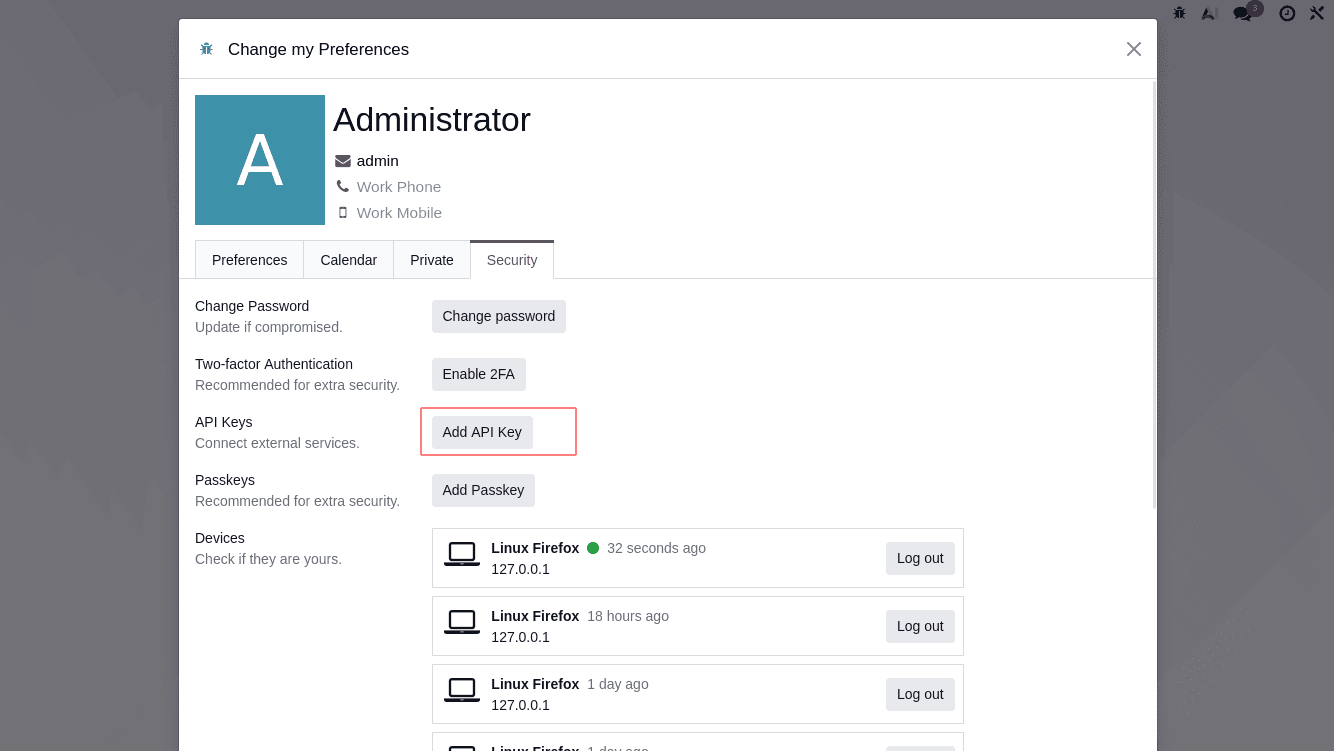
To test the restricted endpoint /res_partners, you first need to create an API key in your Odoo instance. Go to user's preferences > Account Security > New API Key and create a key with desired rights. Use this key to authenticate and call the endpoint:
curl -H "Authorization: Bearer YOUR_API_KEY" \
     http://127.0.0.1:8000/res_partners
You should receive a JSON list of res.partner records.
As you can see, the combination of FastAPI's advanced features and Odoo's ORM allows generating REST APIs with minimal effort while maintaining a high level of performance and security.
With the in-process approach described above, it is possible to obtain a REST API that interacts with Odoo in the best way. FastAPI provides all the necessary components and tools for creating an advanced REST API with rich functionalities. Meanwhile, Odoo offers an amazing ORM and flexible security mechanisms.
The resulting REST layer is powerful and reliable and can be integrated into various applications.
To read more about How to Configure Odoo REST API Module in Odoo 18, refer to our blog How to Configure Odoo REST API Module in Odoo 18.