In Odoo, when you establish a contact of type Contact under a parent company, Odoo automatically replicates the company address onto the contact. Odoo assumes that employees of a firm have the same address, which is the desired behavior. This is exactly right for a lot of firms. It is not applicable in all circumstances. Imagine a company where every contact person is stationed at a separate branch, location, or office. Every time the parent record is saved in these situations, the automatic sync discreetly replaces each contact's meticulously recorded address. This is a problem that is simple to overlook during testing and challenging to explain to users after go-live.
We will examine the internal workings of Odoo 19 address synchronization in this blog, after which we will create a simple, upgrade-safe override that offers the best of both worlds. The address automatically fills in from the parent firm when a contact is initially linked to it, saving the user from having to enter it again. After that, the contact has complete control over its address; it cannot be overwritten by a sync in either direction. Every commercial field synchronization, including pricelist, payment terms, and VAT, is still operating just as Odoo intended. The entire solution lives in Python and one little XML view inherits.
Detecting the Device and Returning the View from Python
The entire python-side logic is contained in one file, models/res_partner.py. We inherit res.partner and modify three methods: onchange_parent_id, _fields_sync, and _children_sync.
Python Code:
from odoo import api, models, _

class ResPartner(models.Model):
    _inherit = 'res.partner'
    @api.onchange('parent_id')
    def onchange_parent_id(self):
        """
        Override: keep the core auto-populate of the address from the parent
        when a contact is first linked to a company, and add back the
        re-parenting warning that core removed in later versions.
        """
        result = super().onchange_parent_id() or {}
        partner = self._origin
        if partner.parent_id and partner.parent_id != self.parent_id:
            result['warning'] = {
                'title': _('Warning'),
                'message': _(
                    'Changing the company of a contact should only be done '
                    'if it was never correctly set. If an existing contact '
                    'starts working for a new company then a new contact '
                    'should be created under that new company. You can use '
                    'the "Discard" button to abandon this change.'
                ),
            }
        # super() already pre-fills the address via _get_address_values().
        # We keep that auto-fill by not suppressing the super call.
        # We do NOT add any address key to result here, so whatever the
        # user edits on the form is preserved when the record is saved.
        return result
    def _fields_sync(self, values):
        """
        Override of base res.partner._fields_sync
        This override fills only empty address fields from the parent on
        parent change, skips the contact-to-parent address write introduced
        in Odoo 19, and keeps all commercial field synchronisation intact.
        """
        self.fetch(['parent_id', 'type', 'commercial_partner_id'])
        # Sync from parent when parent_id changes
        if values.get('parent_id') or values.get('type') == 'contact':
            # Commercial fields: sync when parent changes (core behaviour kept)
            if values.get('parent_id'):
                self.sudo()._commercial_sync_from_company()
            # Address: fill only fields that are currently empty on the contact
            if values.get('parent_id') and self.parent_id and self.type == 'contact':
                address_values = self.parent_id._get_address_values()
                fill_values = {
                    fname: val
                    for fname, val in address_values.items()
                    if not self[fname] and fname not in values
                }
                if fill_values:
                    self._update_address(fill_values)
        # Address sync from contact to parent is intentionally skipped.
        # Commercial fields are still synced upstream (VAT, pricelist, etc.)
        commercial_to_upstream = (
            bool(self.parent_id)
            and (self.commercial_partner_id != self)
            and (
                any(f in values for f in self._synced_commercial_fields())
                or 'parent_id' in values
            )
            and any(
                self[f] != self.parent_id[f]
                for f in self._synced_commercial_fields()
            )
        )
        if commercial_to_upstream:
            self.parent_id.write(self._get_synced_commercial_values())
        # Sync to children
        self._children_sync(values)
    def _children_sync(self, values):
        """
        Override: propagate commercial field changes to all child records,
        but do NOT push address changes from the company down onto contacts.
        Once a contact has an independently edited address it must be preserved.
        """
        if not self.child_ids:
            return
        if self.commercial_partner_id == self:
            fields_to_sync = values.keys() & self._commercial_fields()
            self.sudo()._commercial_sync_to_descendants(fields_to_sync)
        # core's contacts._update_address(values) call is intentionally removed.
The above code is located in models/res_partner.py and addresses three parts: a calculated field that auto-populates upon parent selection, write-time address protection, and child sync control.
The onchange_parent_id method. We call super() first and keep the result value. The core implementation already runs _get_address_values() on the parent and returns the address values to the form layer, which populates the street, city, zip, state, and country fields for the user when they select a company. We fully preserve this auto-populate feature by not silencing the super call and without adding any address keys to the result ourselves. What we put on top is the re-parenting warning, which appeared in previous Odoo versions but was deleted in later releases. It occurs when the user transfers an existing contact from one parent business to another, advising them that creating a new contact is the best option in that circumstance.
The _fields_sync method. This is the foundation of the solution. Every write() on a res.partner record immediately calls _fields_sync. When parent_id appears in the written values, we retrieve the parent's address and create a dictionary named fill_values. This dictionary only includes address fields that are currently empty on the contact and were not expressly included in the current write. The filter has two conditions: not self[fname] guarantees that we never overwrite a field with an existing value, and fname not in values ensures that we do not overwrite whatever the user has just input. This means that the first time you link, the company's entire address is automatically filled in, and future saves on a contact with an altered address leave every field precisely as is. The block that writes address changes from the contact back up to the parent, introduced in Odoo 19, is simply removed. The commercial field sync (VAT, pricelist, payment terms) is maintained in full.
The _children_sync method. The basic implementation propagates commercial field changes to descendants while also calling _update_address(values) on all child contacts to assign the company's new address to them. We preserve the commercial propagation but remove the address push. The practical impact is that if the company's city changes, Delivery and Invoice address-type children continue to update via their own sync path, whilst Contact-type children keep the address that they independently saved.
Making Contact Addresses Visible in the View
The Python override performs all save-time synchronization, but there is one more step. Odoo 19 core uses the criteria invisible="type == 'contact'" in the Contacts and Addresses tab of the partner form to hide the whole address group for contact-type children. If we keep this in place, the user will be unable to see or modify the address on a contact, even if the Python override is active. This restriction is removed by the following view customization.
xml code
<?xml version="1.0" encoding="utf-8"?>
<odoo>
    <!--
        Make address fields visible and editable on contact-type children
        inside the Contacts and Addresses tab.
        Core hides the address group with invisible="type == 'contact'".
        We remove that restriction so users can see and edit the address
        that was auto-filled (or that they entered manually).
    -->
    <record id="view_partner_form_contact_address_editable" model="ir.ui.view">
        <field name="name">res.partner.form.contact.address.editable</field>
        <field name="model">res.partner</field>
        <field name="inherit_id" ref="base.view_partner_form"/>
        <field name="arch" type="xml">
            <xpath
                expr="//page[@name='contact_addresses']//form//group[@name='other_info']"
                position="attributes">
                <attribute name="invisible">0</attribute>
            </xpath>
        </field>
    </record>
</odoo>
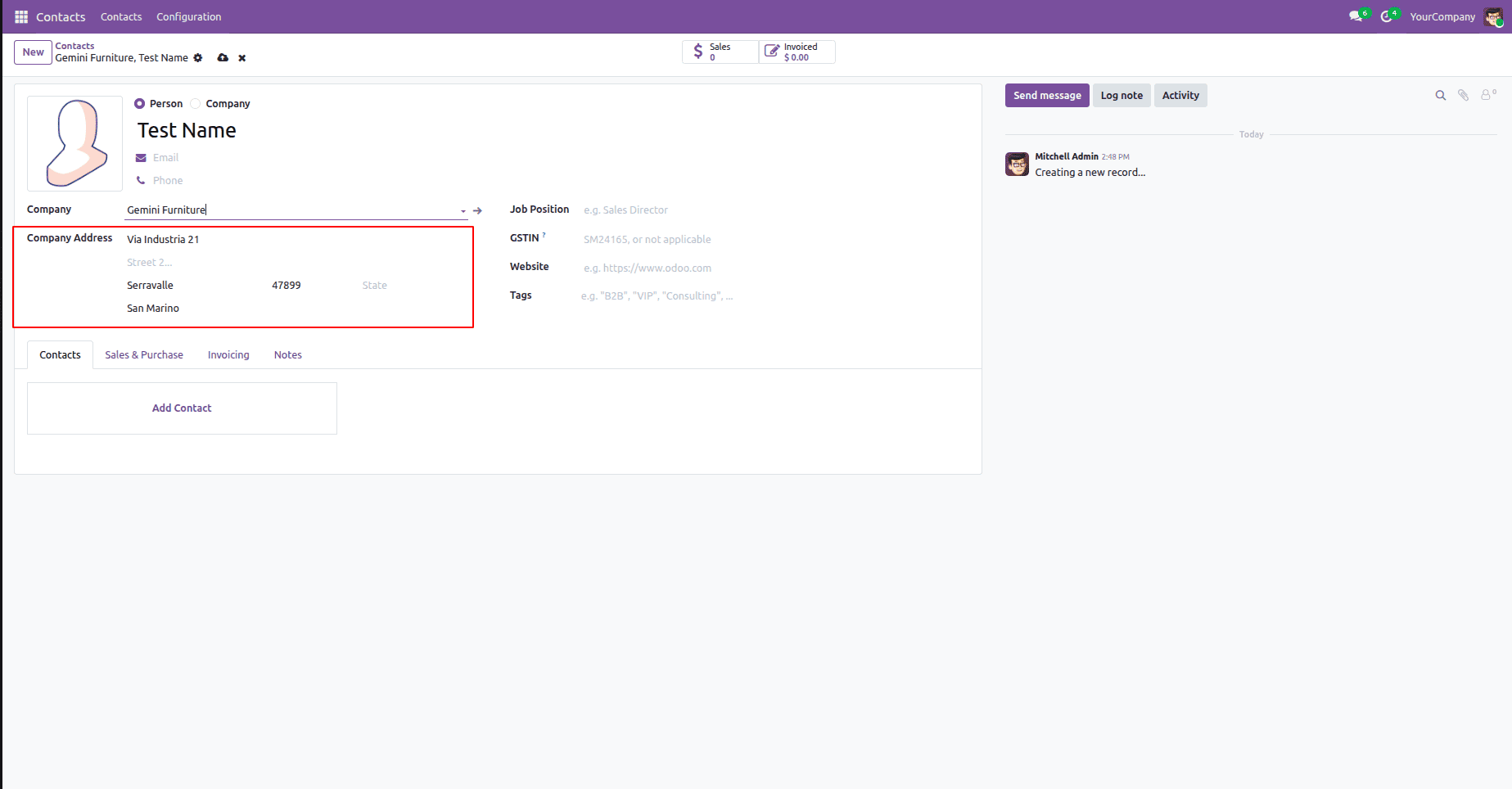
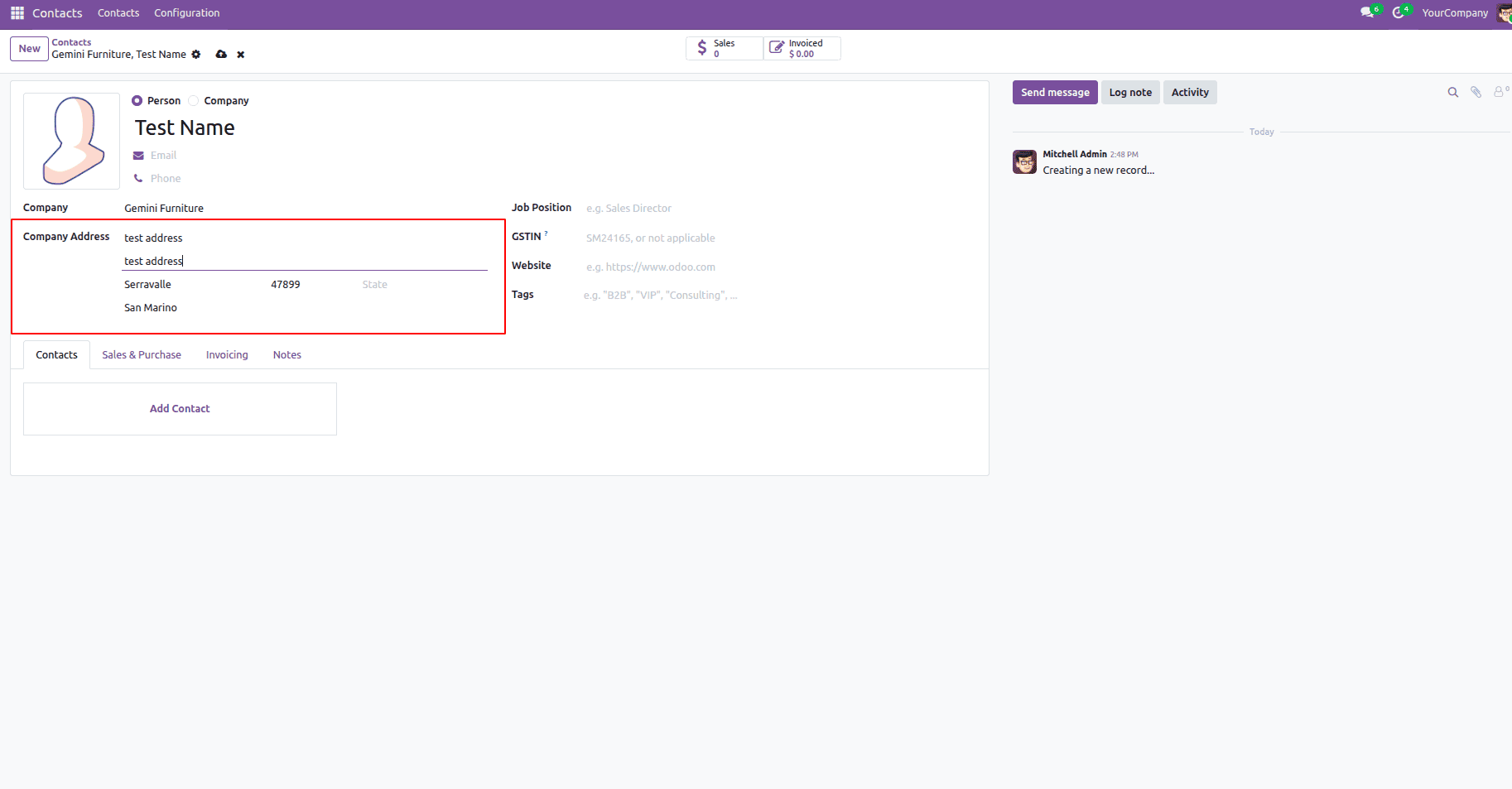
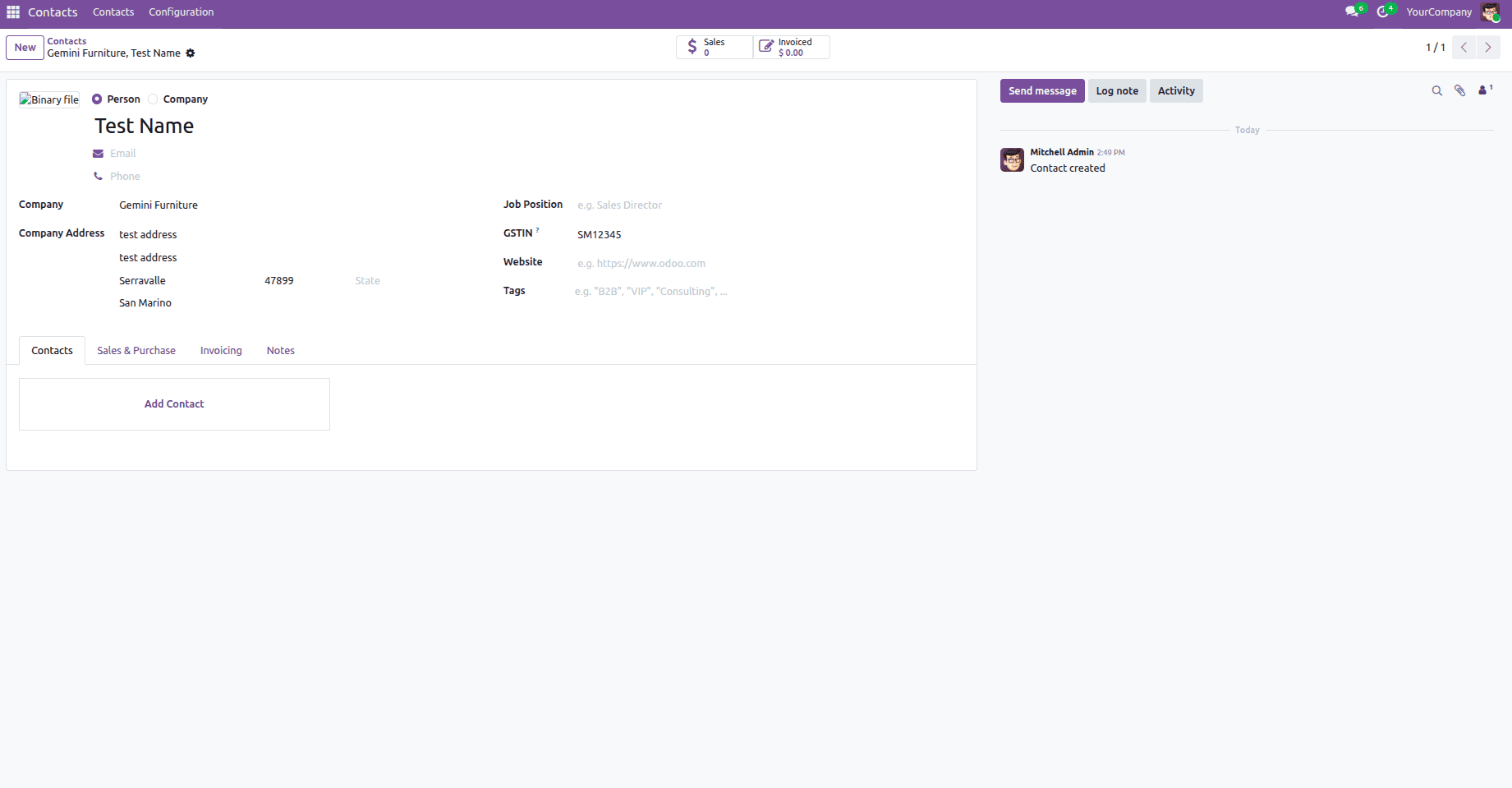
The view record inherits base.view_partner_form and utilizes an xpath to find the group[@name='other_info'] within the embedded form on the Contacts and Addresses tab. In the core view, this group wraps all address fields and includes the invisible condition, which conceals them for contact-type children. Using position="attributes" with <attribute name="invisible">0</attribute> disables the restriction without affecting the rest of the view. This is the smallest change imaginable; only one property is changed, and everything else on the tab remains exactly as core defines it. Because the view inherit requires only the base.view_partner_form is always present; therefore, no further module dependence is required beyond base. The following are the results after customization with the above code example:
Contacts Form View: Parent Company Address Autofill on New Contact Creation:
Contacts Form View: Parent Company Address Autofill on New Contact Creation - After editing the address:
Contacts Form View: Parent Company Address Autofill on New Contact Creation - After saving the contact record:
This blog described how Odoo 19 included two-way address synchronization between contacts and parent companies, as well as how to modify it to permit separate contact addresses while maintaining the original auto-fill function. We maintained commercial field synchronization, avoided undesirable address overwrites, and preserved standard Odoo behavior by overriding onchange_parent_id, _fields_sync, and _children_sync. To guarantee compatibility with more recent Odoo versions, always check core method modifications before reusing overrides during migrations.
To read more about How to Set Up Company Departments in Odoo 19, refer to our blog How to Set Up Company Departments in Odoo 19.