Odoo, a comprehensive ERP solution, provides integrated tools for Sales, CRM, Inventory, and Accounting among other things. The best part is that every application includes analysis reports of different types. Most of the analyses use the pivot view effectively to group, filter, and summarize the data. A great example would be the Sales Analysis Report that gives such information like ordered quantities, sales amounts, and invoicing details sorted by date, sales team, customer, or product. While such reports may be sufficient for most businesses, some organizations are interested in extra data such as payment terms in orders or the goods' value yet to be delivered. Odoo provides companies with an opportunity to use the existing report model by adding missing values instead of creating a new report from scratch.
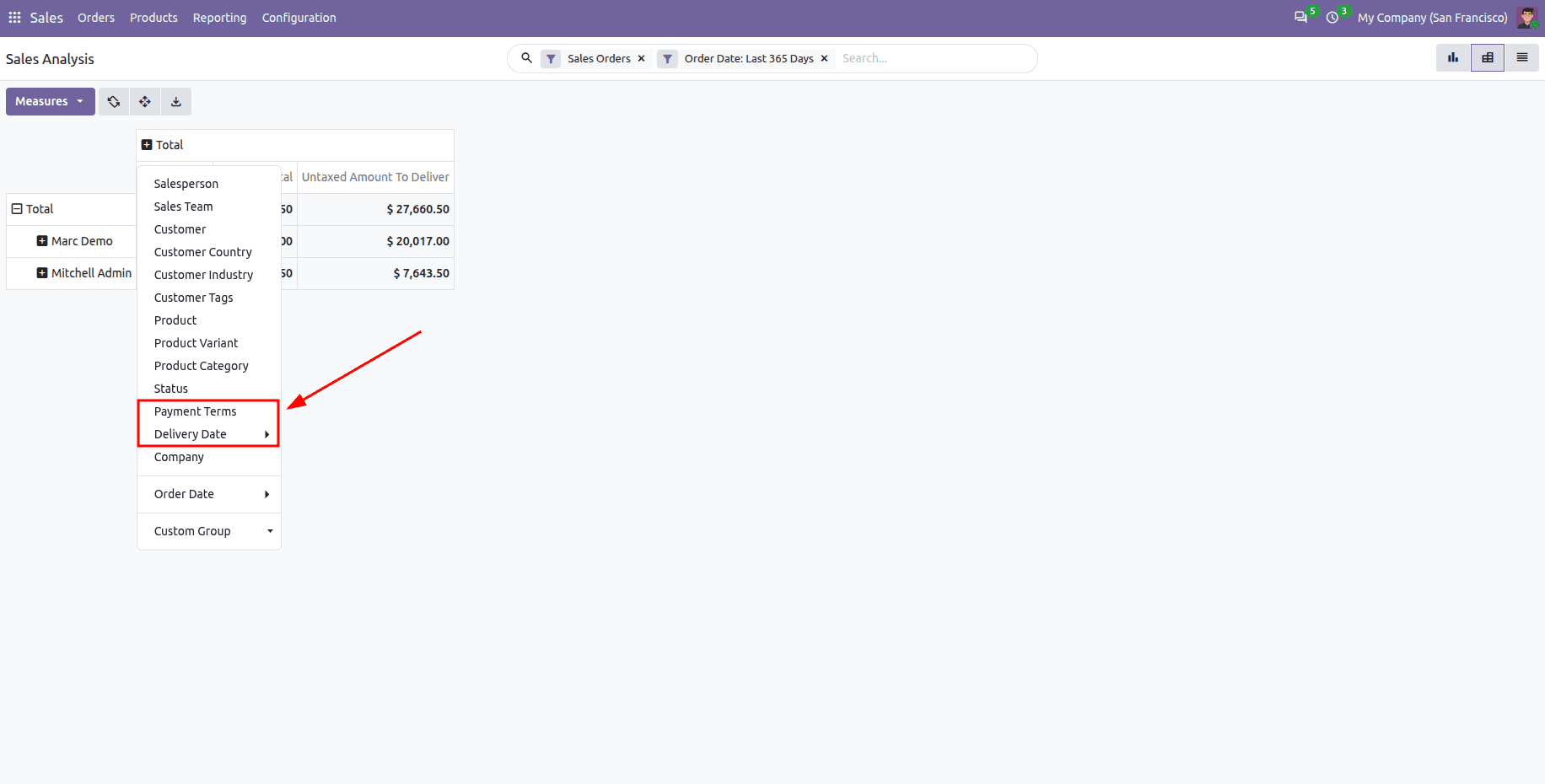
The article will describe how to work with the Sales Analysis report in Odoo 20 while adding new fields (Payment Terms and Delivery Date) to it, as well as a new measure called Untaxed Amount to Deliver. Additionally, we will be changing the current layout of the pivot and the search view in order to insert new filters and grouping options.
Inheriting the Report Model
The Sales Analysis report relies on the sale.report model, which isn't just an ordinary table but a view built from the sale order lines database. The columns of this view in Odoo 20 are defined in the _select_dict() function, which returns the field names and the SQL expressions that correspond to them. To modify the report by including new fields, we inherit sale.report, create the new fields, and modify the _select_dict() function with SQL for each new field introduced.
Python:
from odoo import fields, models
from odoo.tools import SQL

class SaleReport(models.Model):
    _inherit = 'sale.report'
    payment_term_id = fields.Many2one(
        'account.payment.term', string='Payment Terms', readonly=True)
    commitment_date = fields.Datetime(string='Delivery Date', readonly=True)
    amount_to_deliver = fields.Monetary(
        string='Untaxed Amount To Deliver', readonly=True)
    def _select_dict(self, table):
        """Add the new columns to the Sales Analysis SQL query."""
        order_rate = self._case_value_or_one(table.order_id.currency_rate)
        rate = SQL("%s / %s", table.consolidation_rate, order_rate)
        return super()._select_dict(table) | {
            'payment_term_id': table.order_id.payment_term_id,
            'commitment_date': SQL("%s", table.order_id.commitment_date),
            'amount_to_deliver': SQL(
                """CASE WHEN %s IS NOT TRUE
                   THEN SUM((%s - %s) * %s * (1 - COALESCE(%s, 0) / 100.0) * %s)
                   ELSE 0 END""",
                table.is_downpayment,
                table.product_uom_qty,
                table.qty_delivered,
                table.price_unit,
                table.discount,
                rate,
            ),
        }
In this code, three additional fields are introduced into the sale.report model. Both payment_term_id and commitment_date fields are fetched directly from the corresponding sale order using order_id as a reference, thus allowing Odoo to perform the necessary join automatically. The amount_to_deliver field computes the amount of the ordered but undelivered product taking into account line discount. The down payment lines are disregarded just as with the standard amount measures. The calculated amount is multiplied by a currency rate calculated using _case_value_or_one() and the consolidation rate because Odoo is processing its calculations and converting multi-currency orders to the company currency correctly. Ultimately, the new fields are combined with the result of super()._select_dict(table) using the | operator which retains all standard fields of the report and adds our fields to the database view.
Inheriting the Pivot and Search Views
The usage of newly available fields in the report model is mandatory in the report. Since the Sales Analysis pivot view and search view are readily available in the Sale module, we will inherit these views by using inherit_id instead of creating new views and eventually modify only the necessary sections of those inheritor views using XPath.
xml:
<?xml version="1.0" encoding="UTF-8"?>
<odoo>
<!-- Inherit Sales Analysis pivot view -->
<record id="view_order_product_pivot_inherit" model="ir.ui.view">
<field name="name">sale.report.pivot.inherit</field>
<field name="model">sale.report</field>
<field name="inherit_id" ref="sale.view_order_product_pivot"/>
<field name="arch" type="xml">
<xpath expr="//field[@name='team_id']" position="replace">
<field name="payment_term_id" type="col"/>
</xpath>
<xpath expr="//field[@name='product_uom_qty']" position="after">
<field name="price_subtotal" type="measure"/>
<field name="amount_to_deliver" type="measure"/>
</xpath>
</field>
</record>
<!-- Inherit Sales Analysis search view -->
<record id="view_order_product_search_inherit" model="ir.ui.view">
<field name="name">sale.report.search.inherit</field>
<field name="model">sale.report</field>
<field name="inherit_id" ref="sale.view_order_product_search"/>
<field name="arch" type="xml">
<xpath expr="//filter[@name='fully_invoiced']" position="after">
<filter name="pending_delivery" string="Pending Delivery"
domain="[('amount_to_deliver', '>', 0)]"/>
</xpath>
<xpath expr="//filter[@name='status']" position="after">
<filter name="group_payment_term" string="Payment Terms"
context="{'group_by': 'payment_term_id'}"/>
<filter name="group_commitment_date" string="Delivery Date"
context="{'group_by': 'commitment_date'}"/>
</xpath>
</field>
</record>
</odoo>
The initial record is a descendant of the default pivot view sale.view_order_product_pivot. The very first XPath replaces the Sales Team column with Payment Terms, and hence the report is opened with orders grouped by payment terms instead of sales teams. The second XPath adds Untaxed Total as well as the newly introduced Untaxed Amount To Deliver as default measures next to the existing Qty Ordered measure. The second record is a descendant of the default searching view sale.view_order_product_search, and it adds as the very first item the Pending Delivery filter right after the Fully Invoiced filter, which gives as a result only lines that still wait for delivery to happen as well as adds Payment Terms and Delivery Date as Group by options after Status. Since the report model has already been created and its access rights are available in the Sale module, there is no need for a new security file.
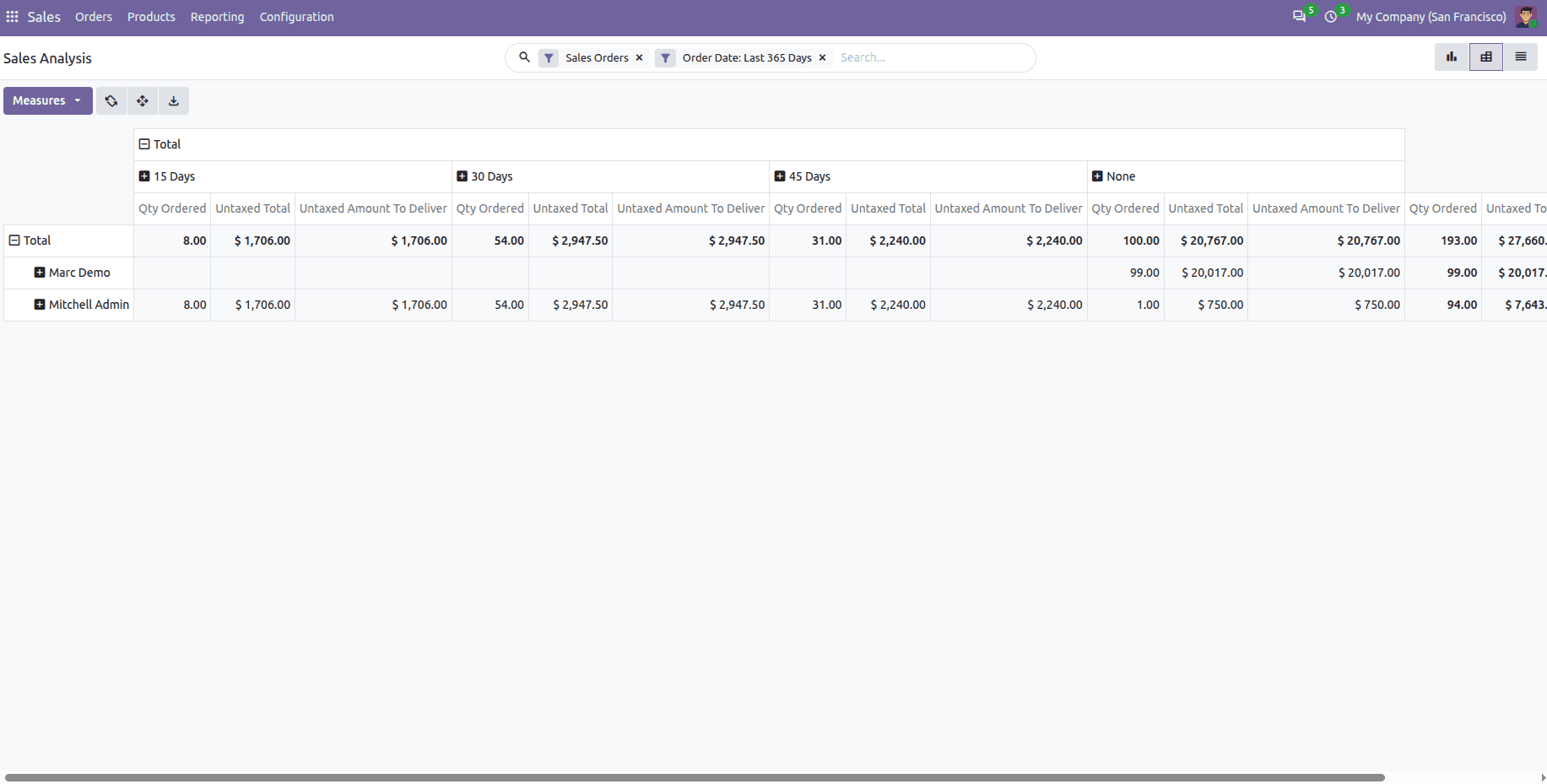
Once the module has been installed, go to Sales > Reporting > Sales and enter the pivot view. Now the report includes Payment Terms in the column, with Qty Ordered, Untaxed Amount and Untaxed Amount To Ship as the default fields.
The update has grouped orders into Payment Terms and also included Untaxed Total and Untaxed Amount To Deliver amounts with Qty Ordered, as shown below.
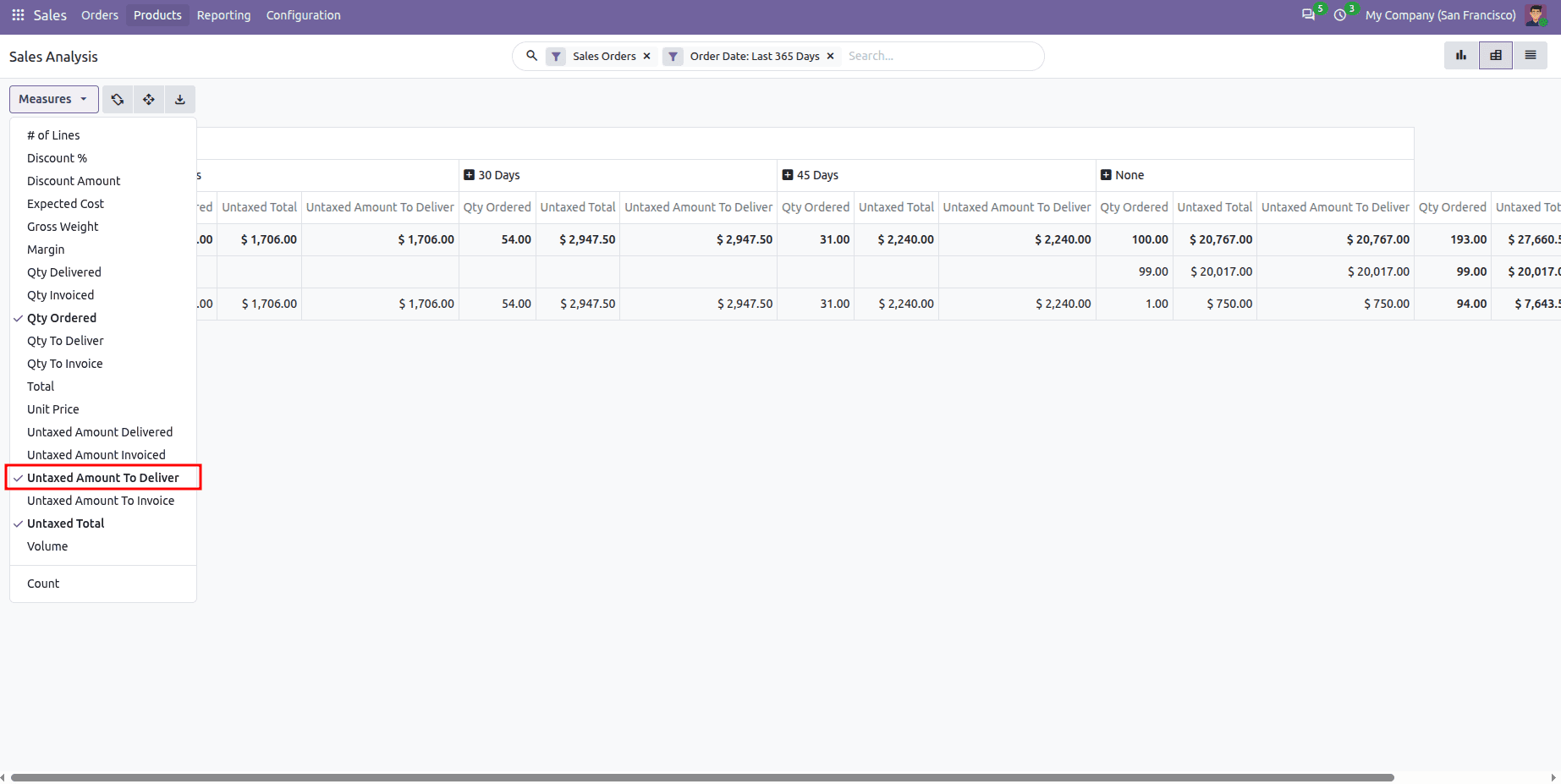
The new Untaxed Amount To Deliver measure is also now available in the Measures dropdown, so users can use it wherever necessary.
To summarize, inheriting an already-existing pivot report in Odoo 20 is the easiest way to enlarge the standard analysis without re-building it from scratch. By inheriting the report model and extending _select_dict(), new fields and measures will appear in the current database view and after inheriting pivot and search views these fields can be easily displayed, filtered and grouped in precisely the places every user needs. This way of reporting would also work for other built-in reports like purchases, invoices and inventory analysis making it possible for customers to adapt the reporting without giving up the standard features of Odoo.
To read more about How To Inherit Existing Pivot View Report in Odoo 19, refer to our blog, How To Inherit Existing Pivot View Report in Odoo 19.