CI/CD in ERPs is not only an engineering concept; it is also a necessity for the safety structure. Considering the case of Odoo 19, which has multiple functions ranging from accounting, stock control, payroll, sales process, and manufacturing process that coexist within the same ORM framework, any modification may result in a chain reaction affecting multiple business processes. CI/CD testing will guarantee that any modifications will be tested in a well-defined environment.
This blog describes the concept of CI/CD automated testing in Odoo 19 with some technical examples.
Continuous Integration in Odoo 19
The process of Continuous Integration in Odoo 19 begins after a programmer commits his code to the repository. The CI server sets up a brand new PostgreSQL server, creates a new database, performs the Odoo registry, installs all needed modules, and executes all specified tests using the --test-enable option. In this way, validation will be carried out in an environment where there is no impact on the local database by the programmer.
A common CI command looks like this:
odoo-bin -d test_db --test-enable --stop-after-init -i custom_module
Here, Odoo passes through all the processes involved in module installation, which includes validation of XML views, parsing of data files, loading of the dependency, and populating the model registry. In case of an error like a non-existent XPath expression in an inherited view or a missing dependency in the manifest, the module installation fails. Therefore, any error in the structure of the module is detected early enough to prevent the merging of the module into the master branch.
Backend Business Logic Validation
Odoo's power lies in Odoo ORM business logic. Programmers can overwrite standard methods, such as create, write, unlink, action_confirm, or action_post. If no validations are present automatically, the overrides will fail to take into consideration the accounting process or inventory management.
Let’s assume that you want to prohibit posting invoices when your client has exceeded his/her credit limit.
from odoo import models
from odoo.exceptions import ValidationError
class AccountMove(models.Model):
    _inherit = 'account.move'
    def action_post(self):
        for move in self:
            if move.partner_id.x_credit_used > move.partner_id.credit_limit:
                raise ValidationError("Credit limit exceeded")
        return super().action_post()
An automated test ensures this rule remains enforced:
from odoo import Command
from odoo.exceptions import ValidationError
from odoo.tests.common import TransactionCase

class TestCreditLimit(TransactionCase):
    @classmethod
    def setUpClass(cls):
        super().setUpClass()
        cls.partner = cls.env["res.partner"].create({
                         "name": "Test Partner",
                         "credit_limit": 1000,
                         "x_credit_used": 2000,
                      })
    def test_invoice_blocked(self):
        invoice = self.env["account.move"].create({
                  "partner_id": self.partner.id,
                  "move_type": "out_invoice",
                  "invoice_line_ids": [ Command.create({
                       "name": "Test product",
                       "quantity": 1,
                       "price_unit": 100, }), ],
                  })
        with self.assertRaises(ValidationError):
            invoice.action_post()
In the future, if any modification to the action_post() method removes the validation, CI will immediately fail. This protects financial integrity before deployment.
Ensuring ORM and Computed Field Stability
Computed fields in Odoo pose high risks, as they usually summarize data over relations. A small bug in your computation function can lead to either inaccurate totals or performance problems.
For example, a custom computed field for computing total order weight:
class SaleOrder(models.Model):
    _inherit = 'sale.order'
    total_weight = fields.Float(compute='_compute_total_weight')
    @api.depends( "order_line.product_id.weight", "order_line.product_uom_qty", )
    def _compute_total_weight(self):
        for order in self:
            order.total_weight = sum(order.order_line.mapped('product_id.weight'))
A corresponding test make sure that computation remains stable:
from odoo.tests import TransactionCase
class TestWeightCompute(TransactionCase):
    @classmethod
    def setUpClass(cls):
        super().setUpClass()
        cls.partner = cls.env["res.partner"].create({
            "name": "Weight Test Customer", })
        cls.product = cls.env['product.product'].create({
            'name': 'Weighted Product',
            'weight': 5,
        })
    def test_weight_calculation(self):
        order = self.env['sale.order'].create({
            'partner_id': self.partner.id})
        self.env['sale.order.line'].create({
            'order_id': order.id,
            'product_id': self.product.id,
            'product_uom_qty': 2,
        })
        self.assertEqual(order.total_weight, 5)
For CI/CD, these tests prevent any accidental changes to business calculation logic which could affect logistics and invoicing.
Security and Access Rule Enforcement
The Odoo security system functions at two levels: ACL and record rule levels. Incorrect use of sudo() and wrong domains can lead to the exposure of sensitive information within different companies and user profiles.
Automated CI test cases replicate various user profiles to make sure that access rules are in place:
def test_user_cannot_modify_order(self):
    user = self.env['res.users'].create({
        'name': 'Limited User',
        'login': 'limited_user',
    })
    order = self.env['sale.order'].sudo().create({
        'partner_id': self.partner.id,
    })
    with self.assertRaises(Exception):
        order.with_user(user).write({'note': 'Unauthorized'})
This ensures that security limits do not get breached during development. For enterprise Odoo 19 deployments, especially those with multi-company accounting systems, this validation becomes crucial.
Performance Regression Detection
Since Odoo is very relational-based and lazy loading is used for prefetching, poor performing code will cause N+1 query problems. There are ways to perform performance assertions via CI/CD:
Odoo supports an assertion for query count:
def test_query_efficiency(self):
    with self.assertQueryCount(1):
        self.env["res.partner"].search([], limit=10).mapped("name")
If a developer adds an unnecessary search inside a loop, the query count increases, and CI fails. This type of automated regression testing is especially valuable in modules handling large datasets such as inventory valuation or payroll processing.
Frontend Testing in Odoo 19
Odoo 19 uses OWL-based frontend technology, and its JavaScript unit-testing framework is HOOT (Hierarchically Organized Odoo Tests).
For eg:-:
import { expect, test } from "@odoo/hoot";
test("basic calculation works", () => {
    expect(2 + 2).toBe(4);
});
For web-client tests, Odoo provides additional helpers through web_test_helpers.
For example:
import { expect, test } from "@odoo/hoot";
import { getFixture } from "@odoo/hoot-dom";
test("fixture is available", () => {
    const fixture = getFixture();
    expect(fixture).toBeTruthy();
});
Actual component tests should use the appropriate HOOT and web-test-helper APIs for the component being tested. A component such as FormController cannot simply be mounted without the required environment, props, services, and view setup.
Odoo 19 JavaScript test files normally use the .test.js naming convention and are placed under the module's static/tests directory. They are included in the appropriate test asset bundle.
For example:
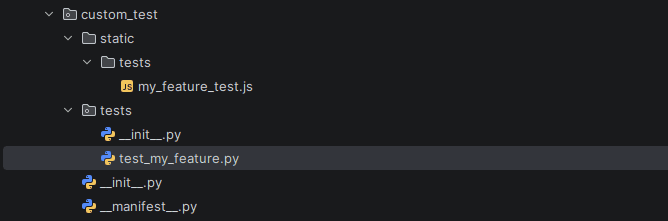
Front-end unit tests can be executed from Odoo's /web/tests test interface.
For complete business-flow testing, Odoo also provides browser-based integration testing and tours. These are useful when the goal is to verify that the frontend and backend work together rather than testing JavaScript in isolation.
Continuous Deployment Strategy
Once all CI tests pass, Continuous Deployment moves validated code to staging. A typical workflow is:
- Developer pushes feature branch
- CI pipeline runs automated tests
- Pull request is reviewed
- Merge to main branch
- Automatic deployment to staging
- Smoke tests executed
- Production deployment triggered
A minimal GitHub Actions configuration:
name: Odoo 19 CI
on:
  push:
  pull_request:
jobs:
  test:
    runs-on: ubuntu-latest
    services:
      postgres:
        image: postgres:15
        env:
          POSTGRES_USER: odoo
          POSTGRES_PASSWORD: odoo
    steps:
      - uses: actions/checkout@v4
      - name: Install dependencies
        run: pip install -r requirements.txt
      - name: Run Odoo Tests
        run: odoo-bin -d test_db --test-enable --stop-after-init -i custom_module
Deployment takes place only when all automated validations pass.
The automated CI/CD testing that occurs within Odoo 19 ensures that the development process turns into a properly engineered one. There is no need to detect mistakes when the finances have already been entered or when there is a problem with validating stock movements. The business rules will be enforced; the security rules will be enforced; the performance will be consistent.
Considering the close connection of the components that Odoo 19 is based on, CI/CD automated testing cannot simply be considered a developer-friendly practice. It is a necessity for any enterprise-scale deployment.
To read more about A Complete Guide on How CI/CD Pipelines Improve Odoo Development, refer to our blog A Complete Guide on How CI/CD Pipelines Improve Odoo Development.