Customers can authorize companies to collect payments automatically from their connected bank accounts by completing a SEPA Direct Debit mandate. With the EURO SEPA Service in Odoo 19, companies can easily collect money from their clients using SEPA Direct Debit. This function works perfectly when payments are made repeatedly by the client.
The SEPA payment system, which is developed by the European Union, makes euro-based electronic payments simpler and easier. Customers permit businesses to make direct charges on their account using SEPA Direct Debit (SDD). This system is highly valuable in subscription services where there are periodic payments.
Financial transaction management is very crucial to the smooth running of businesses. Odoo is a versatile ERP software that has been developed to facilitate the effective management of different types of business activities. Direct Debit Mandates are one of the key components of financial management systems that facilitate the ease of collecting payments from clients.
Customers authorize businesses to automatically collect payments from their bank accounts for purchases or subscriptions by signing direct debit mandates.
In an Odoo environment, these mandates are essential for:
- Effectiveness: By eliminating manual payment processing, direct debits reduce the administrative workload for businesses. Payments are automatically initiated on scheduled dates, helping ensure timely and consistent collection.
- Cost Reduction: Automating payment collection reduces administrative expenses by minimizing manual payment processing, paper-based invoicing, and cheque handling.
- Improved Cash Flow: Consistent and reliable payments improve cash flow management, allowing businesses to plan more effectively and allocate their resources efficiently.
- Improved Customer Experience: Customers benefit from automatic payments by avoiding the hassle of manually initiating transactions and keeping track of payment due dates.
- Reduced Late Payments: By reducing the likelihood of late payments, direct debit arrangements help businesses maintain a more reliable and consistent revenue stream.
Odoo enables businesses to create SDD mandate registrations and also creates XML documents that include all the necessary details that will be debited from the customers. Then, the bank uses this document to debit the customer’s account according to the mandates that have been created.
The SEPA Direct Debit function can be set up from the Settings tab of the Accounting module in Odoo 19. The next step is to add the Creditor Identifier of the company in the relevant field.
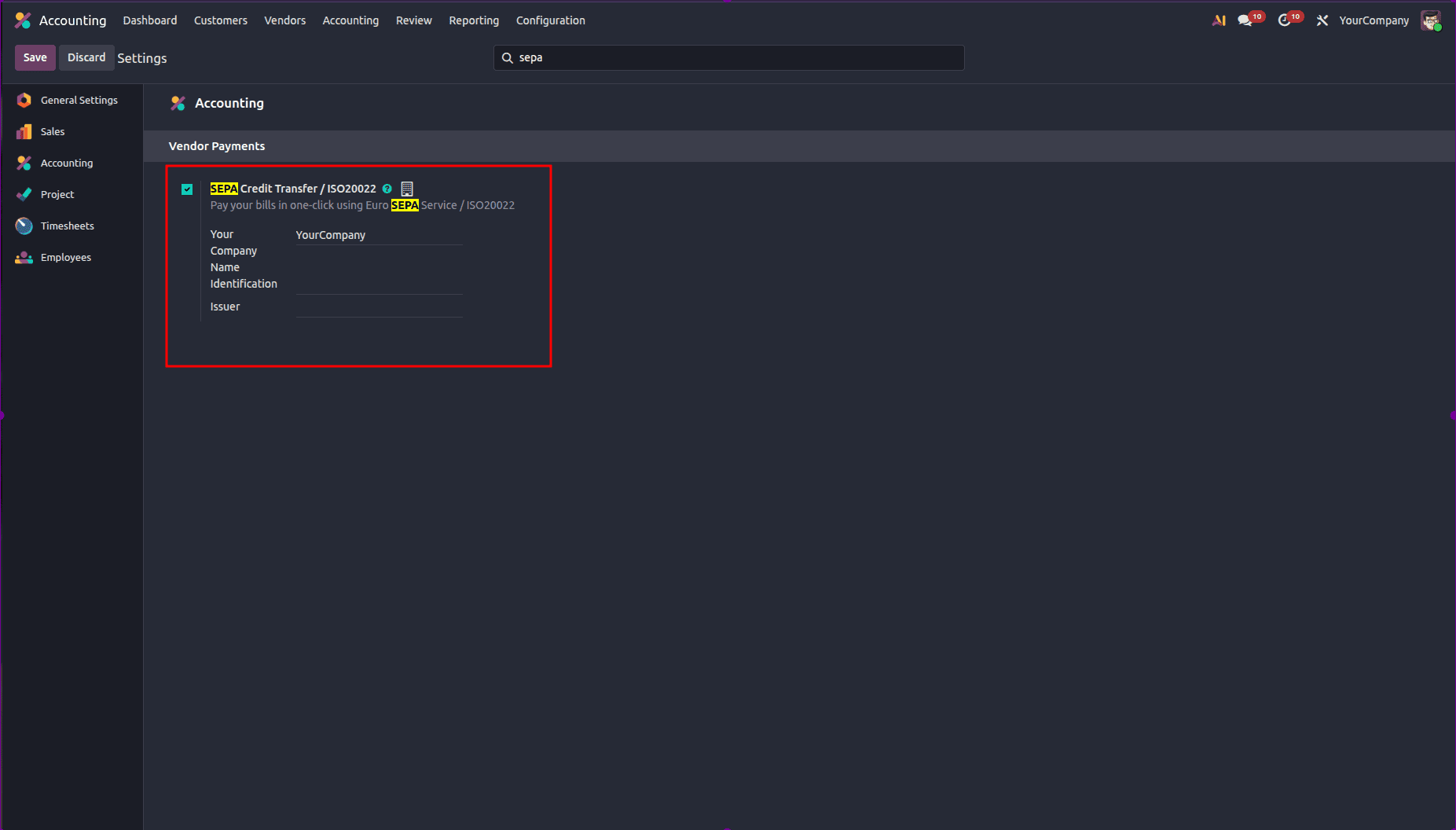
After configuring the feature, users are now able to create a new Direct Debit Mandate using the Customers option. Whenever a user creates an invoice for a customer who has a valid mandate and on the same date, users can go ahead and collect payments through the creation of a SEPA Direct Debit (SDD) XML file, which is then submitted to the bank.
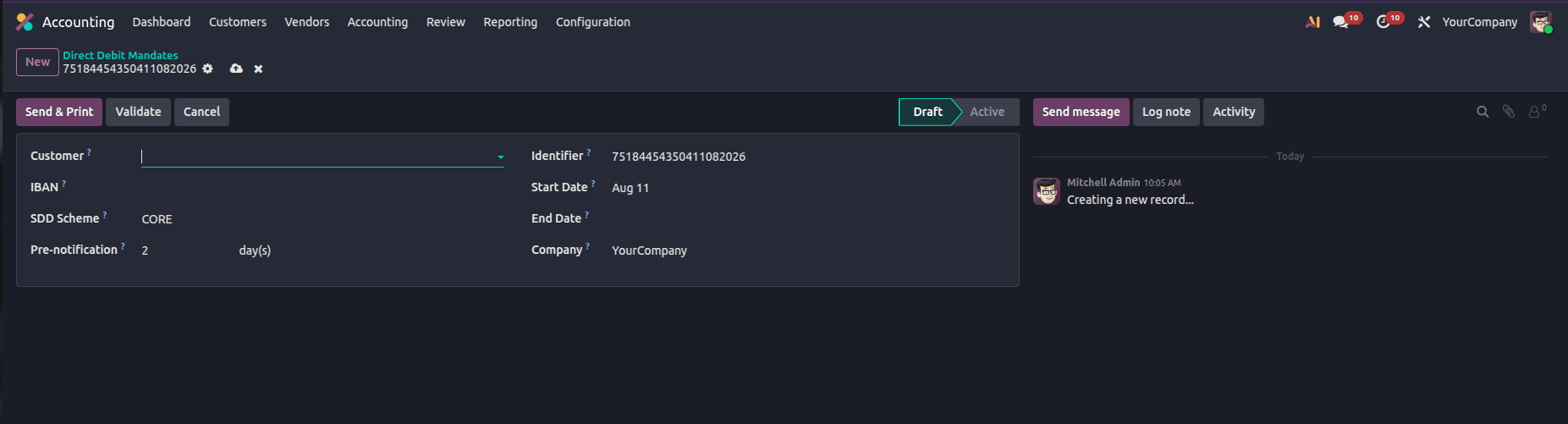
Go to the Accounting > Customers menu > Direct Debit Mandates.
Choose from the list of customers who will have the payments collected through the mandate in the Customer field. The bank account of the customer is entered in the IBAN field to indicate the bank account from which the payments will be collected. The SEPA Direct Debit payments linked to the mandate will appear in the Journal that is selected in the form. The details of the mandate that need to be configured include the SDD Scheme, Unique Mandate Identification, Start Date, End Date, and Company.
- Customer: Choose the customer to whom the mandate applies.
- IBAN: Provide the customer’s bank account information by entering their International Bank Account Number (IBAN).
- Journal: Choose the bank journal used to process SEPA Direct Debit transactions.
- SDD Scheme: Select the appropriate SEPA Direct Debit scheme based on the customer type: CORE for consumer payments (B2C) or B2B for business-to-business transactions. The B2B scheme is optional and is available exclusively for business payers. However, availability may vary, as some banks do not support the B2B SDD scheme.
- Pre-notification: Specify the minimum number of days required to notify the customer before the payment is collected.
- Unique Mandate Identifier: Provide a unique reference number for the mandate.
- Start Date & End Date: Specify the start and end dates to define the mandate’s validity period.
- Company: Select the appropriate company if multiple entities are configured.
After filling in all the required fields, click Validate to confirm the mandate.
If you have to collect repeated charges from a client, ABC Corp, through a subscription-based product using the Direct Debit method, after inserting your company's creditor identifier and activating the SEPA Direct Debit feature on Odoo, you can create a new Direct Debit Mandate for ABC Corp.
Select the appropriate SDD Scheme (such as CORE for a standard subscription), enter ABC Corp’s IBAN, choose the relevant bank journal, and define the mandate’s start and end dates.
Once the mandate is validated, Odoo automatically recognizes it as active when an invoice is created for ABC Corp, such as a monthly subscription invoice. After validating the invoice, you can generate an XML file for submission to your bank, allowing the payment to be collected directly from ABC Corp’s bank account. The related smart buttons provide quick access to the invoice paid through the mandate and display the outstanding amount associated with the customer.
With the help of Odoo 19’s sophisticated ERP functionality, businesses are able to make use of the complete SEPA Direct Debit process. Using the EURO SEPA feature, businesses are able to collect payments from customers’ bank accounts efficiently, whereas using the SEPA Direct Debit feature, businesses are able to manage signed mandates for payment collection.
To read more about Overview of Direct Debit Mandates in Odoo 18 Accounting, refer to our blog Overview of Direct Debit Mandates in Odoo 18 Accounting.