Writing code that works is only the first step in software development. The true value of a codebase lies in its readability, maintainability, and scalability. Since Odoo projects are often developed and maintained by multiple developers, following a common coding standard becomes essential. Odoo Coding Guidelines provide a structured approach to organizing modules, naming files, writing Python code, managing XML records, designing extensible applications, and building clean frontend interfaces.
These guidelines cover both backend and frontend development – from module structure and Python best practices to JavaScript conventions, SCSS styling, and CSS variable management. By following these standards, developers can reduce complexity, improve collaboration, and make future customizations significantly easier.
Part 1: Backend Development Guidelines
Understanding Odoo Module Structure
Development and maintenance are made much simpler by a well-structured module. Based on functionality, Odoo advises splitting a module into several folders. Developers can easily find business logic, views, security rules, reports, and static assets thanks to this division.
Below is a list of the most popular directories.
- data/– demo and data XML files
- models/– model definitions
- controllers/– HTTP route controllers
- views/ – views and templates
- static/ – web assets (CSS, JS, pictures, libraries)
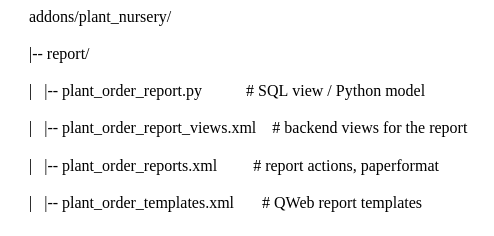
Other alternative directories are tests/ for Python tests, report/ for printable reports and SQL views, and wizard/ for temporary models.
By adhering to this format, developers may determine a module's purpose just by looking at its directory structure.
File Naming Conventions
Developers can more easily determine a file's purpose when it is named consistently. Odoo advises using only lowercase letters, digits, and underscores ([a-z0-9_]) when naming files in accordance with the model or functionality they represent.
Business logic should be grouped by the primary model in model files. To make it obvious which Odoo models are being extended, each model should have its own file and inherited models should be put in different folders.
For example, a Plant Nursery application would be structured as follows:
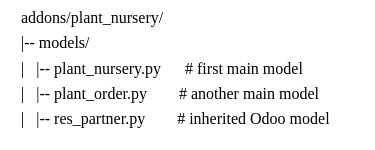
Security files should be separated into three main files: ir.model.access.csv for access rights, <module>_groups.xml for user groups, and <model>_security.xml for record rules.
View files should be split like models and suffixed with _views.xml. Templates for portal or website functionality should use the _templates.xml suffix. An optional <module>_menus.xml file can be created for main menus not linked to specific actions.
Data files should be grouped by purpose (demo or configuration data) and by main model, using _data.xml and _demo.xml suffixes respectively.
Controller files should be named after the module rather than using the outdated main.py convention. Inherited controllers should be named after the module being extended – for example, portal.py when extending the portal controller.
Wizard files follow the same naming convention as models: <transient>.py and <transient>_views.xml, both placed inside the wizard/ directory.
Report files should be organized as follows:
XML Development Guidelines
Since XML defines views, actions, menus, and security records, it is essential for Odoo development. When declaring records, Odoo advises utilizing the <record> tag and putting the id attribute before the model attribute. When it comes to fields, the name attribute should appear first, then the value and any other characteristics in that order of significance.
Only when setting non-updatable data with noupdate=1 can the <data> tag be used. noupdate=1 can be directly applied to the <odoo> tag without the need for a <data> wrapper if all of the file's data is not updateable.
<record id="view_id" model="ir.ui.view">
    <field name="name">view.name</field>
    <field name="model">object_name</field>
    <field name="priority" eval="16"/>
    <field name="arch" type="xml">
        <list>
            <field name="my_field_1"/>
            <field name="my_field_2" string="My Label" widget="statusbar"
                   statusbar_visible="draft,sent,progress,done" />
        </list>
    </field>
</record>
Odoo also supports shortcut tags such as menuitem (for ir.ui.menu records) and template (for QWeb views requiring only the arch section). These are preferred over the <record> notation where applicable.
XML IDs and Naming Conventions
Meaningful XML IDs help developers identify records quickly and simplify debugging. Odoo recommends the following patterns.
- Views: _view—for example, model_name_view_form, model_name_view_kanban
- Actions: _action for the main action, with a _ suffix for additional actions
- Window actions: _action_view_
- Menus: _menu or _menu_do_stuff for submenus
- Groups: _group_
- Rules: _rule_
The name attribute of a record should mirror its XML ID, with dots replacing underscores.
<!-- Views -->
<record id="model_name_view_form" model="ir.ui.view">
    <field name="name">model.name.view.form</field>
</record>
<!-- Actions -->
<record id="model_name_action" model="ir.act.window">
    <field name="name">Model Main Action</field>
</record>
<!-- Menus -->
<menuitem id="model_name_menu_root" name="Main Menu" sequence="5"/>
<menuitem id="model_name_menu_action" name="Sub Menu 1"
    parent="module_name.module_name_menu_root"
    action="model_name_action" sequence="10"/>
<!-- security -->
<record id="module_name_group_user" model="res.groups">
    <field name="name">User</field>
    <field name="category_id" ref="base.module_category_..."/>
</record>
<record id="model_name_rule_public" model="ir.rule">
    <field name="name">model.name.rule.public</field>
    <field name="model_id" ref="model_model_name"/>
    <field name="domain_force">[('state', '=', 'published')]</field>
    <field name="groups" eval="[(4, ref('base.group_public'))]"/>
</record>
Inheriting XML views should keep the same XML ID as the original record and add a .inherit.{details} suffix to the view name. This makes it easy to identify all inheritance at a glance.
<record id="model_view_form" model="ir.ui.view">
    <field name="name">model.view.form.inherit.module2</field>
    <field name="inherit_id" ref="module1.model_view_form"/>
</record>
New primary views based on an existing view do not require the inherit suffix since they represent new records.
Coding Standards for Python
Odoo puts readability over conciseness and adheres to Python standard practices. It is important to write code that is simple to comprehend and update.
Three categories comprise import organization: imports from other Odoo addons, imports from the Python standard library, and imports from the Odoo framework. Imports are arranged alphabetically inside each group.
# 1: Python standard library
import base64
import re
import time
from datetime import datetime
# 2: Odoo framework
from odoo import Command, _, api, fields, models
from odoo.fields import Domain
from odoo.tools.safe_eval import safe_eval as eval
# 3: Odoo addons
from odoo.addons.web.controllers.main import login_redirect
Python best practices encouraged by Odoo include the following.
Dictionary updates should use concise syntax rather than assigning keys one by one.
# bad
my_dict['foo'] = 3
my_dict['bar'] = 4
# good
my_dict.update(foo=3, bar=4)
List comprehensions should replace unnecessary loops whenever they improve readability.
# not ideal
cube = []
for i in res:
    cube.append((i['id'], i['name']))
# better
cube = [(i['id'], i['name']) for i in res]
Collections are boolean in Python, avoid redundant length checks.
# unnecessary
if len(some_collection):
    ...
# better
if some_collection:
    ...
dict.setdefault() should be used for building dictionaries inside loops.
values = {}
for element in iterable:
    values.setdefault(element, []).append(other_value)
Writing Extensible Code
One of the most important principles in Odoo development is extensibility. Methods should focus on a single responsibility and avoid containing too much business logic. Large methods are difficult to maintain and even more difficult to customize.
Breaking functionality into smaller helper methods allows other modules to extend or override specific behaviors without duplicating large sections of code.
# avoid: modifying the domain requires overriding the entire method
def action(self):
    partners = self.env['res.partner'].search(complex_domain)
    emails = partners.filtered(lambda r: arbitrary_criteria).mapped('email')
# better: each piece of logic can be overridden independently
def action(self):
    partners = self.env['res.partner'].search(self._get_partner_domain())
    emails = partners.filtered(lambda r: r._filter_partners()).mapped('email')
Managing Context Correctly
The Odoo context is a frozendict and cannot be modified directly. Whenever additional context values are needed, with_context() should be used to create a modified context for a specific operation.
records.with_context(new_context).do_stuff()           # replaces all context
records.with_context(**additional_context).do_stuff()  # merges with existing context
Care should be taken when adding context keys because context values propagate automatically and may affect other models unexpectedly. Unique and descriptive context key names help prevent conflicts.
Database Transaction Management
Odoo automatically manages database transactions for RPC calls, scheduled actions, and tests. Because of this, developers should never manually call cr.commit() or cr.rollback() unless they have explicitly created their own database cursor.
def execute(self, db_name, uid, obj, method, *args, **kw):
    db, pool = pooler.get_db_and_pool(db_name)
    cr = db.cursor()
    try:
        res = pool.execute_cr(cr, uid, obj, method, *args, **kw)
        cr.commit()  # all good, we commit
    except Exception:
        cr.rollback()  # error, rollback everything atomically
        raise
    finally:
        cr.close()  # always close cursor opened manually
    return res
Manual commits can result in inconsistent data, incomplete rollbacks, workflow desynchronization issues, and tests that cannot be rolled back cleanly.
Exception Handling Best Practices
Developers should catch only specific exceptions and avoid broad exception handling. Catching every exception can hide important errors and leave the ORM in an inconsistent state.
# bad
try:
    do_something()
except Exception as e:
    _logger.warning(e)
When exception handling is truly needed, savepoints should be used to isolate operations and ensure that failures do not affect unrelated transactions.
try:
    with self.env.cr.savepoint():
        do_stuff()
except ...:
    ...
Translation Guidelines
Odoo uses the _() method to mark static strings for translation. Only static strings should be passed to this function. Dynamic strings, field values, or string concatenation will not work correctly and will corrupt the translation system.
# good: plain static string
error = _('This record is locked!')
# good: string with formatting parameter
error = _('Record %s cannot be modified!', record)
# bad: formatting before passing to translation
error = _('Record %s cannot be modified!' % record)
# bad: dynamic string concatenation
error = _("'" + question + "' cannot be processed")
When multiple variables are involved, named parameters are preferred over positional ones as they are easier for translators to work with.
error = _("Answer to question %(title)s is not valid.", title=question)Naming Conventions for Models, Fields, and Methods
Model names should use singular form with dot notation, prefixed by the module name. For example, res.partner and sale.order rather than res.partners or sales.orders. Transient models (wizards) should be named as <related_base_model>.<action>, and report models as <related_base_model>.report.<action>.
Python classes should use PascalCase.
class AccountInvoice(models.Model):
    ...
Variable names should use PascalCase for model variables and underscore_lowercase for common variables.
Field naming follows strict conventions. Many2One fields should end with _id, and One2Many or Many2Many fields should end with _ids.
Method naming follows these patterns:
- Compute method: _compute_
- Search method: _search_
- Default method: _default_
- Onchange method: _onchange_
- Constraint method: _check_
- Action method: action_ — must call self.ensure_one() at the start
Model Attribute Order
For consistency across modules, Odoo recommends organizing model definitions in the following order:
- Private attributes (_name, _description, _inherit, …)
- Default methods and default_get
- Field declarations
- SQL constraints and indexes
- Compute, inverse, and search methods (same order as field declarations)
- Selection methods
- Constraint methods (@api.constrains) and onchange methods (@api.onchange)
- CRUD methods (ORM overrides)
- Action methods
- 1Business methods
Part 2: Frontend Development Guidelines
Static File Organization
Odoo modules often include frontend assets such as JavaScript files, stylesheets, images, fonts, and QWeb templates. All of these should be placed inside the static/ directory of the module. The Odoo server automatically serves files from this folder.
The recommended structure is as follows:
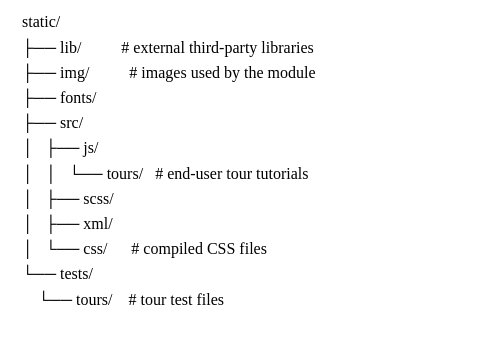
An important rule is to never link images or libraries from outside Odoo. External URLs must not be used for images; the files should be copied into the codebase instead.
JavaScript File Structure
JavaScript files should be organized by functionality. Each component should have its own file with a meaningful name. Rather than placing all logic inside a single large file, developers should divide functionality into reusable, clearly-named components.
For example, instead of a single main.js file, the structure should look like:
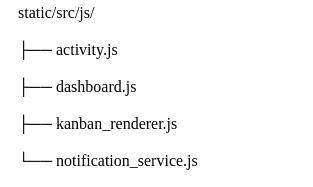
Templates for JavaScript widgets (static XML files) and their styles (SCSS files) follow the same organizational logic.
JavaScript Coding Guidelines
Odoo encourages developers to follow standard JavaScript best practices. "use strict"; is recommended for all JavaScript files, as it helps identify common coding mistakes and improves reliability. A linter such as JSHint should be used to catch syntax issues, unused variables, and inconsistent patterns.
Minified JavaScript libraries should never be added directly to modules. Keeping readable source files makes maintenance and debugging significantly easier.
Class names should use PascalCase to align with Odoo's naming conventions.
class SalesDashboard extends Component {
    setup() {
        super.setup();
    }
}
Meaningful class names are essential. A class named A tells a developer nothing, while CustomerPortalMenu immediately communicates its purpose.
SCSS and CSS Formatting Standards
Consistent formatting is required across all styling files. Odoo recommends four-space indentation (no tabs), one property per line, a maximum line width of approximately 80 characters, opening braces on the same line as selectors, and closing braces on their own line.
.o_customer_card {
    margin: 1rem;
    padding: 1rem;
    border-radius: 4px;
}
Property ordering should go from the "outside" in: start with positioning, then layout, spacing, borders, backgrounds, typography, and finally visual effects such as filter. Scoped SCSS variables and CSS variables must be placed at the very top of a block, followed by an empty line.
.o_element {
    $-inner-gap: $border-width + $legend-margin-bottom;
    --element-margin: 1rem;
    --element-size: 3rem;
    @include o-position-absolute(1rem);
    display: block;
    margin: var(--element-margin);
    width: calc(var(--element-size) + #{$-inner-gap});
    padding: 1rem;
    background: blue;
    font-size: 1rem;
    filter: blur(2px);
}
CSS Naming Conventions
Odoo requires classes to be prefixed with o_<module_name>, where the module name is the technical name of the module (such as sale, im_chat) or the main route reserved by the module. ID selectors must be avoided.
<!-- correct -->
<div class="o_sale_dashboard"></div>
<!-- incorrect -->
<div id="dashboard"></div>
Specific and deeply nested class names should also be avoided. Odoo recommends a "grandchild" approach each class describes its own element rather than its full ancestry.
<!-- bad: mirrors DOM nesting in the name -->
<a class="o_element_wrapper_entries_entry_link">Entry</a>
<!-- good: describes only the element itself -->
<a class="o_element_link">Entry</a>
SCSS Variable Naming Standards
SCSS variables follow the pattern $o-[root]-[element]-[property]-[modifier].
$o-block-color: value;
$o-block-title-color: value;
$o-block-title-color-hover: value;
This structure immediately communicates the component, the element, the property, and the variable controls. Using variables also means that a shared color or size value can be updated from a single location rather than being changed across dozens of files.
.o_dashboard {
    $-inner-gap: 10px;
    margin-right: $-inner-gap;
    .o_dashboard_child {
        margin-right: $-inner-gap * 0.5;
    }
}
SCSS Mixins and Functions
Mixins allow styling logic to be reused across multiple components. Odoo's naming convention for mixins and functions is o-[name], using descriptive names and imperative verbs for functions (get, make, apply, etc.). Optional arguments follow the scoped variable form $-[argument].
@mixin o-avatar($-size: 1.5em, $-radius: 100%) {
    width: $-size;
    height: $-size;
    border-radius: $-radius;
}
Functions allow calculations and return values dynamically.
@function o-invert-color($-color, $-amount: 100%) {
    $-inverse: change-color($-color, $-hue: hue($-color) + 180);
    @return mix($-inverse, $-color, $-amount);
}
CSS Variables
CSS variables stay accessible in the browser once the stylesheet is loaded, in contrast to SCSS variables that are compiled away. CSS variables are only utilized in Odoo for contextual UI modifications; they are not used for global design system management. When a component's properties need to change based on where it is rendered, they are especially helpful.
CSS variables follow the BEM naming convention: --[root]__[element]-[property]--[modifier].
.o_kanban_record {
    --KanbanRecord-width: 300px;
    --KanbanRecord__picture-border: 1px solid #ddd;
}
// Adapt the component in a different context
.o_form_view {
    --KanbanRecord-width: 400px;
}
Default fallback values should be provided when defining CSS variables inside a component's block.
.o_MyComponent {
    color: var(--MyComponent-color, #313131);
}
CSS Variables vs SCSS Variables
Although CSS and SCSS variables seem identical, they serve different purposes and should be handled differently.
The design system is built using SCSS variables, which are only needed during compilation. They cannot be altered during runtime. Because CSS variables are still available in the browser, they are ideal for contextual styling that needs to change dynamically.
Odoo recommends combining the two: use SCSS variables to establish the design system values, then use CSS variables to apply those values in certain contexts.
// Define the design-system value using SCSS
$o-dashboard-color: #017e84;
// Apply it contextually using a CSS variable
.o_dashboard {
    --Dashboard-color: #{$o-dashboard-color};
}
// Use the CSS variable in the component
.o_MyComponent {
    color: var(--Dashboard-color, #{$o-component-color});
}
The :root Pseudo-Class
In its UI, Odoo frequently avoids declaring CSS variables on the :root pseudo-class. While rival frameworks usually utilize :root to expose CSS variables worldwide, Odoo saves CSS variables for contextual changes and uses SCSS variables for global design settings. This technique maintains modularity while reducing inadvertent stylistic side effects.
Creating high-quality code is more special than simply writing the code. For scalable development, we need well-structured modules, clear and meaningful names, structured XML, reusable and extensible methods, etc. When we work independently or as part of a large development team, following Coding standards creates code that is easy to understand, debug, and maintain.
To read more about Overview of What Developers Need to Know in Odoo 19 Technical Changes, refer to our blog Overview of What Developers Need to Know in Odoo 19 Technical Changes.